October 22, 2026

Blog


Your email can have the right audience, a strong offer and great creative, and none of it matters if nobody opens it. The subject line and preheader are the first things a recipient sees, and often the only things they see before deciding whether to open, ignore or delete.
The best subject lines and preheaders are short, clear about the offer, and written as one message. Keep subject lines to about 30 to 50 characters, put the most important words first, use the preheader to add a second reason to open, and test variations instead of guessing.
Below, we walk through nine best practices we use to help brands win the open before they ask for the click.
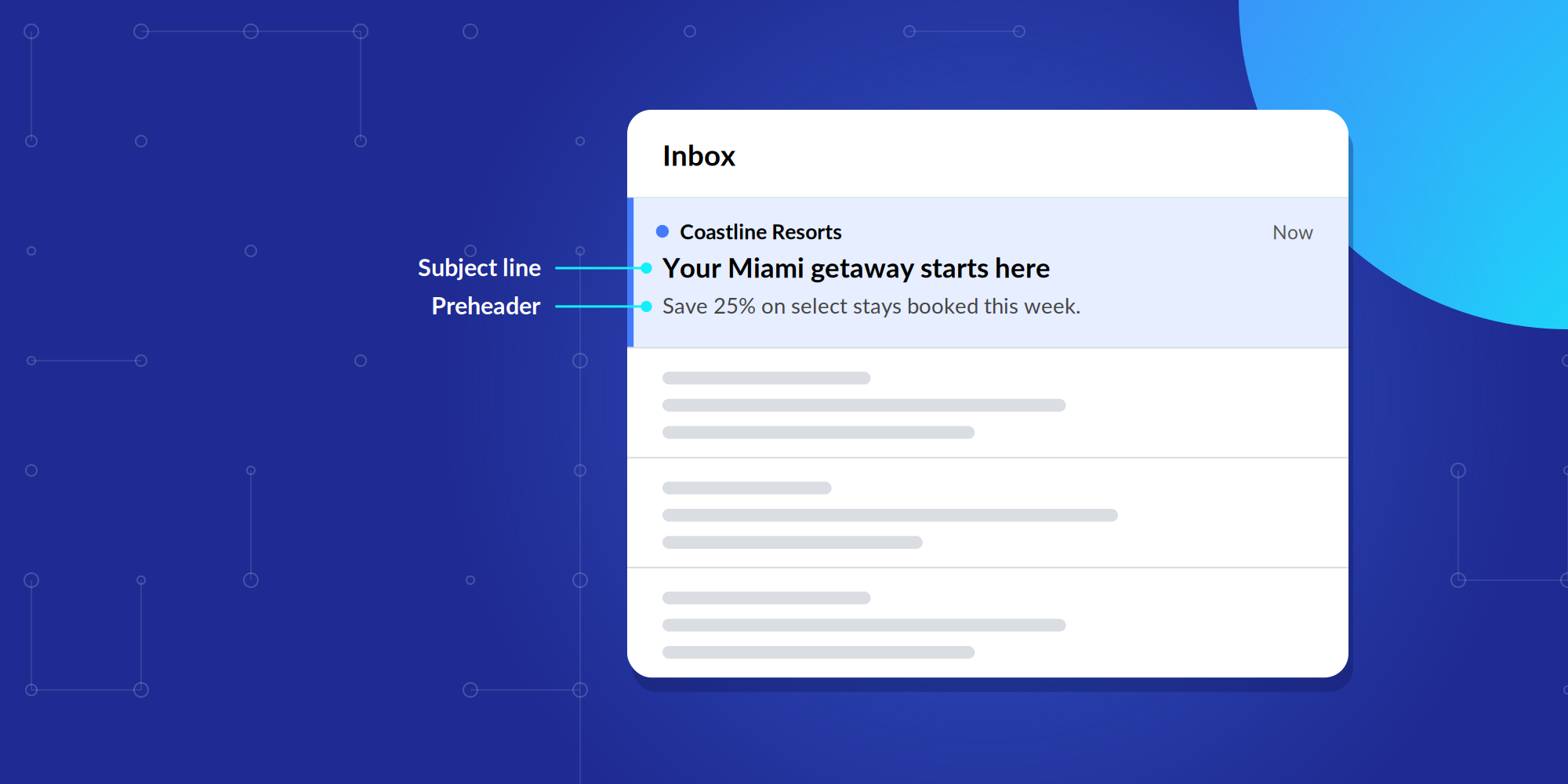
The subject line is the headline of your email. It appears in bold in the inbox and gives recipients their first sense of what the message is about.
The preheader, also called preview text, is the short line of text that appears next to or below the subject line in most inboxes. If you don't set one, many email clients pull in the first text in the email body instead, which is often something like "View in browser."
Here's how the two work together in an inbox:
The subject line sets the scene. The preheader delivers the offer and the urgency.
Aim for about 30 to 50 characters. Longer subject lines aren't inherently bad, but they're more likely to get cut off on a phone screen, where much of your audience will see them first.
If a longer subject line is necessary, make sure the part that shows on mobile still makes sense on its own.
Recipients should instantly see why the email matters to them. A clever subject line can work, but not if the value gets lost along the way.
Compare "You won't believe this" with "25% off fall boots this weekend." The second one tells the reader exactly what they get. Clarity also keeps you on the right side of the law: under the CAN-SPAM Act, subject lines can't be misleading about what's inside the email.
Put the most important words at the start of the subject line. Inbox views and mobile screens can truncate the end, and many people scan only the first few words before deciding.
"Free shipping ends tonight on all orders" holds up even if it gets cut off. "Our biggest sale of the season includes free shipping" loses its best detail first.
No single word decides whether an email lands in the inbox or the spam folder. Mailbox providers weigh many signals, including sender reputation, email authentication and how recipients engage with your messages.
Instead of avoiding a list of "forbidden" words, focus on being accurate, relevant and trustworthy. A subject line that matches the content of the email helps far more than one that tiptoes around certain terms.
Skip the "!!!", ALL CAPS, repeated emojis and unusual symbols. One intentional use can work, such as a single emoji that fits your brand or a well-placed exclamation point. Overuse makes an email look less trustworthy to readers and filters alike.
Names, locations and interests can make a subject line more useful. "New listings in Austin this week" is more relevant than "New listings this week."
Relevance matters more than inserting a first name, though. A personalized subject line with a generic offer still feels generic.
The preheader is extra subject line real estate. Don't repeat the subject line, and don't let it default to "View in browser" or an unsubscribe link. Use it to finish the thought the subject line started.
The subject line earns attention. The preheader adds context, explains the benefit or gives a second reason to open.
Read together, they answer the recipient's real question: why should I open this email?
There's no universal formula for a winning subject line. Test meaningful variations, such as an offer-led line against a curiosity-led line, or a short subject line against a more descriptive one, and let the results decide.
Test one change at a time so you know what made the difference, and judge results by clicks and conversions as well as opens.
Subject lines matter even more when you're reaching new customers. People who have never heard of your brand have no loyalty to fall back on, so the subject line and preheader have to earn the open on their own.
That's where we come in. Our Email Enhanced solution combines email marketing with digital media, so your message reaches the right prospects in the inbox and across the web. Our Identity Graph helps you build an audience that fits your ideal customer profile, so a well-written subject line lands in front of people likely to care about it.
Speak with our team and see how Email Enhanced can work for you.
Aim for about 30 to 50 characters. That range is short enough to display fully on most mobile screens while leaving room to communicate a clear offer.
A preheader, or preview text, is the short line that appears next to or below the subject line in the inbox. It gives recipients a second reason to open and should complement the subject line rather than repeat it.
No single word determines whether an email reaches the inbox. Mailbox providers weigh many signals, including sender reputation, authentication and engagement. Accurate, relevant subject lines matter more than avoiding specific words.
One emoji that fits your brand and message can work. Repeated emojis, like excessive punctuation or ALL CAPS, can make an email look less trustworthy. Test emoji and non-emoji versions with your audience to see what performs better.
Send two versions that differ in one meaningful way, such as an offer-led versus a curiosity-led line, to comparable segments of your audience. Compare opens, clicks and conversions, then use the winner and keep testing.
Read more insights on building effective campaigns through quality data and strategic audience engagement.

October 29, 2026
Someone who has spent ten minutes browsing SUVs online is in a very different place from someone comparing prices on a specific model and looking at nearby dealerships.
October 20, 2026
How to reach new audiences with email marketing

Self-serve
White-label
200M+ consumers